Introduction
Web and Cloud Firewall log transfer into enterprise SIEM platforms using Zscaler’s Nanolog Streaming Service (NSS). As cloud-based security controls generate large volumes of telemetry, traditional log forwarding methods may struggle with scale and performance. The article focuses on how NSS enables near real-time, high-throughput log streaming from Zscaler security services into SIEM systems, improving visibility, monitoring, and security analytics.
Key Takeaways
- Zscaler’s Nanolog Streaming Service enables high-volume log streaming to enterprise SIEMs.
- Web and Cloud Firewall log transfer becomes near real-time with reduced latency.
- Structured log delivery improves correlation and analysis in SIEM platforms.
- Scalable streaming supports cloud-first security architectures without performance bottlenecks.
Loginsoft, as part of its Technology Engagement in delivering comprehensive cybersecurity services, has successfully implemented the Zscaler Nanolog Streaming Service (NSS) for one of its Enterprise Cloud SIEM clients. By deploying a virtual appliance, its Content Pack engineers enabled real-time streaming of security information and access event logs detected by Zscaler. These logs are seamlessly configured to integrate with the client’s Enterprise Cloud SIEM, enhancing their customer’s ability to monitor, analyze, and respond to security incidents effectively.
Deploying Zscaler NSS: A Step-by-Step Guide
Requirements:
- An active NSS license and access to the Zscaler NSS web administration interface.
- Identify each log type that you want to monitor such as Web, Firewall, DNS and destinations required for your organization.
Setup/ Configuring ZScaler NSS using VMware:
- Deploy the NSS Virtual Appliance-on-premises or in the cloud as per requirement.
- Here we have three platforms to choose from – VMWare, AWS and Azure. This section has instructions for VMWare.
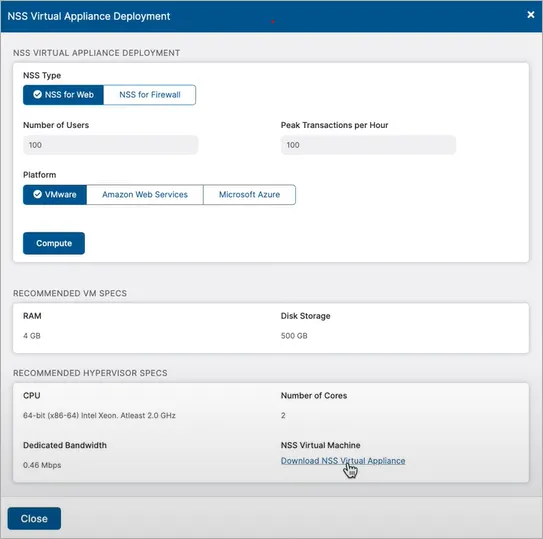
- Download the virtual appliance and register VM in ESXi with the OVA file.
- Configure network connectivity and upload the required certificates for secure communication.
- Add NSS Feed by defining SIEM IP address, port number, log format, output format.
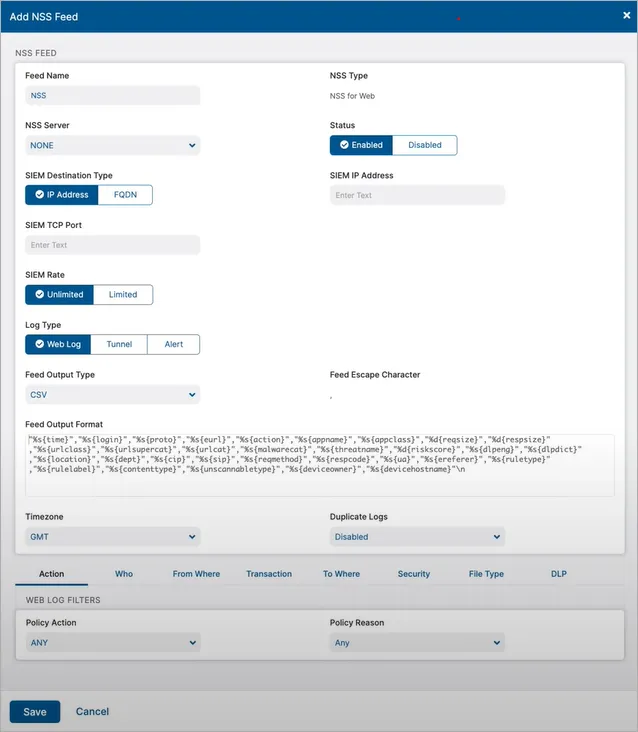
Log Formats: CEF, Syslog, LEEF
Sample Web Logs:
Syslog
<14>1 2024-12-24T12:01:00Z host.domain.com NSS - - - action=blocked app_name=HTTP dst_ip=203.0.113.20 dst_port=80 proto=TCP src_ip=192.0.2.15 src_port=54321 bytes=12345 duration=15 rule_label=Block_HTTP rule_id=102 category=Web_Browsing url=http://blocked-site.com
CEF
CEF:0|Zscaler|NSS|1.0|102|Web Browsing|8|act=blocked app=HTTP dst=203.0.113.20 dpt=80 proto=TCP src=192.0.2.15 spt=54321 cs1Label=Rule_Label cs1=Block_HTTP cs2Label=Category cs2=Web_Browsing cs3Label=URL cs3=http://blocked-site.com rt=2024-12-24T12:01:00Z in=12345 out=0 du=15
LEEF
LEEF:2.0|Zscaler|NSS|1.0|102|devTime=2024-12-24T12:01:00Z src=192.0.2.15 dst=203.0.113.20 dpt=80 proto=TCP spt=54321 app=HTTP cat=Web_Browsing rule=Block_HTTP action=blocked bytesIn=12345 duration=15 url=http://blocked-site.com
Verify Ingestion on your cloud SIEM
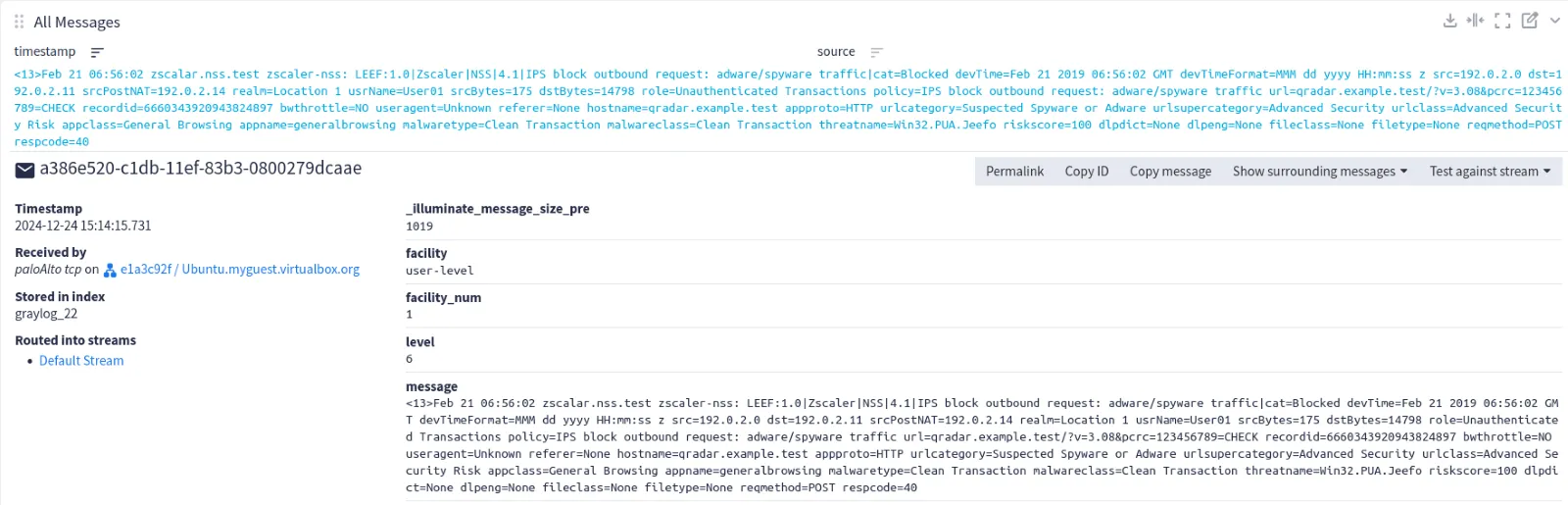
- Verify that the SIEM configuration is functioning correctly, including the launch of the input with the appropriate type, protocol, and port.
- Secure transmission can be ensured with the availability of TSL/SSL certificates.
- Create test scenarios from the Zscaler NSS Troubleshooting section on the admin portal.
- To identify transmission errors, we can examine the Zscaler NSS logs.
- Using SIEM search queries like 'source:' and 'action:' can validate logs.
- Logs can be validated by using queries in SIEM search like source:"<NSS hostname>" AND action:*
Conclusion
The blog highlights that using Zscaler’s Nanolog Streaming Service is an effective approach to handling large-scale Web and Cloud Firewall log transfer into enterprise SIEM environments. By streaming logs efficiently and consistently, NSS ensures security teams maintain visibility into cloud and web traffic without sacrificing performance. This integration strengthens monitoring, improves threat detection, and supports scalable security operations in modern cloud-centric networks.
FAQ
Q1. What is Zscaler’s Nanolog Streaming Service (NSS)?
NSS is a streaming service that delivers high-volume security logs from Zscaler services to external systems such as SIEMs.
Q2. Why are Web and Cloud Firewall log transfer important?
It provides visibility into web and cloud traffic, enabling detection, investigation, and compliance monitoring.
Q3. How does NSS differ from traditional log forwarding?
NSS is designed for high throughput and low latency, making it more suitable for large-scale cloud environments.
Q4. What types of logs can be streamed using NSS?
Logs generated by Zscaler web and cloud firewall services, including security and traffic events.
Q5. What is the main benefit of integrating NSS with a SIEM?
It ensures scalable, real-time log ingestion that improves security analytics and incident response.
Into September: Chained Zero-Days, AI Under Attack, and the Rise of ToxNetV2
Explore the key security, speed, and performance differences between TLS 1.3 and TLS 1.2
Ready to Find and Fix Your Security Weak Points?
LoginSoft's cybersecurity experts help organizations conduct thorough gap analyses, build prioritized remediation roadmaps, and achieve measurable security maturity improvements.
Schedule a Security Assessment
Hari Charan
A MESSAGE FROM OUR TECHNOLOGY LEADER
The NVD enrichment cutback is not a surprise to us - it’s the inflection point we’ve been preparing for. At Loginsoft, we’ve spent years building the research depth and tooling infrastructure to independently enrich vulnerabilities at scale, with the accuracy and context modern security programs require. LOVI is our answer. Our mission is simple: ensure that no CVE relevant to your environment goes unanalyzed, unscored, or unactioned - regardless of what remains in NIST’s queue.
Get Notified
BLOGS AND RESOURCES